1: Use the appropriate platform on Facebook
A Facebook Profile is different from a Facebook Page, which are both different than Facebook Groups
“What is a Facebook Page?”
(http://www.facebook.com/help/?faq=174987089221178)
“Pages are for organizations, businesses, celebrities, and bands to broadcast great information in an official, public manner to people who choose to connect with them. Similar to profiles, Pages can be enhanced with applications that help the entity communicate and engage with their audiences, and capture new audiences virally through friend recommendations, News Feed stories, Facebook events, and beyond… .”
How are Pages different from personal profiles?
(http://www.facebook.com/help/?faq=217671661585622)
“Profiles represent individuals and must be held under an individual name, while Pages allow an organization, business, celebrity, or band to maintain a professional presence on Facebook. You may only create Facebook Pages to represent real organizations of which you are an authorized representative.
In addition, Pages are managed by admins who have personal Facebook profiles. Pages are not separate Facebook accounts and do not have separate login information from your profile. They are merely different entities on our site, similar to how Groups and Events function. Once you have set up a Page within your profile, you may add other admins to help you manage this Page. People who choose to connect to your Page won’t be able to see that you are the Page admin or have any access to your personal account.”
“How are Pages different from Groups? Which one should I create?” … see http://www.facebook.com/help/?faq=155275634539412
2: Starting and Managing a Facebook Page
- Create a Page: http://www.facebook.com/pages/create.php
- Posting/Uploading Images to the Wall: Status update limit = 420 characters; photo upload caption does not impose this character limit.
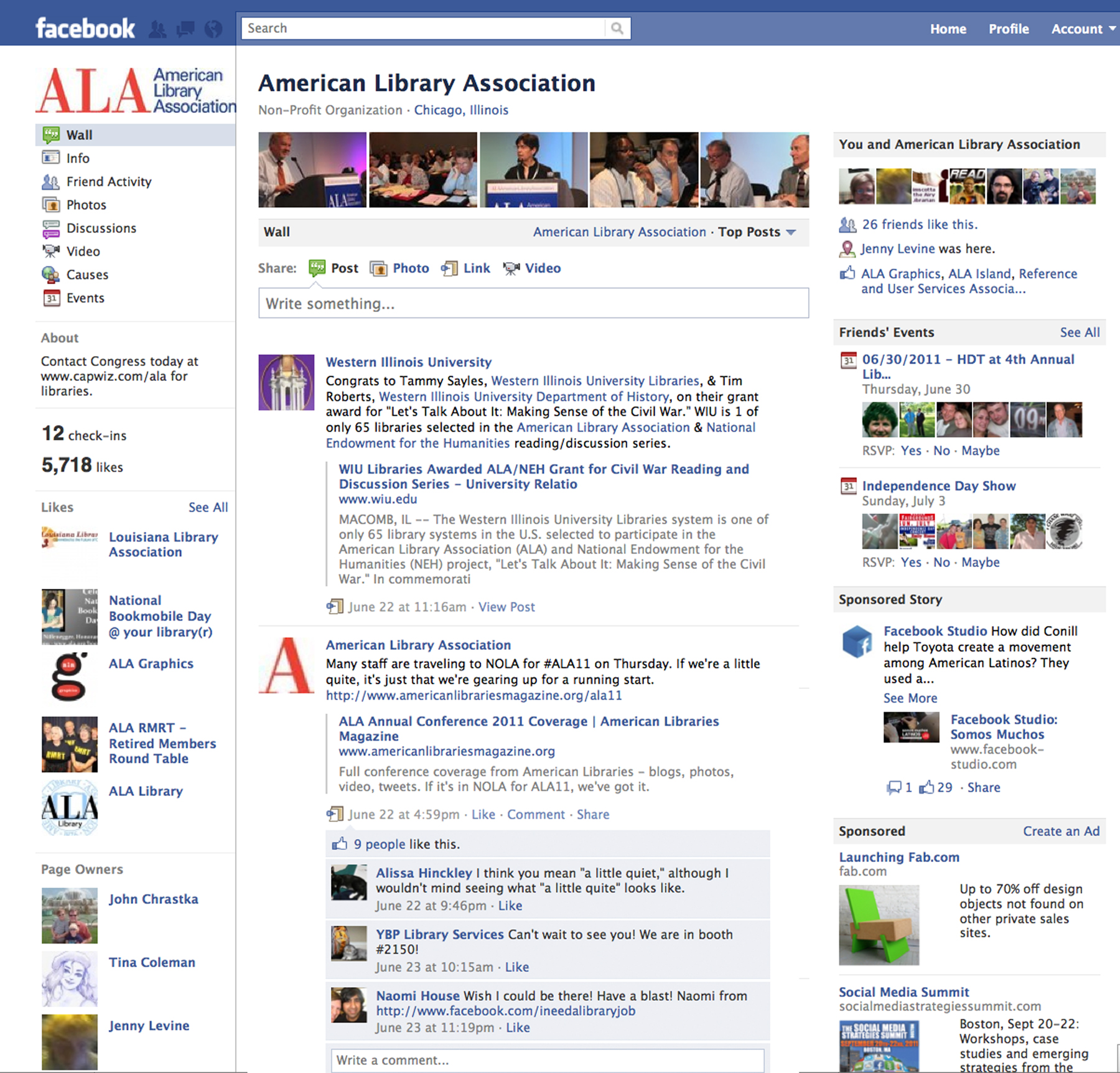
- Use @ tags to show posts on other Facebook Pages (see the ALA FB page screenshot @ right).
- Set a Custom URL (Username) for Your Page after 25 “Likes”: http://www.facebook.com/username/
3: Customization of Your Facebook Page
If you started your Facebook page prior to this spring, FBML, or Facebook Markup Language, is a Facebook-developed app you can utilize to customize your page. (Around mid-March, Facebook started the process of deprecating FBML: see this post on the Wall Street Journal’s All Things D blog @ http://allthingsd.com/20110309/facebook-deprecates-fbml-tomorrow-aw-poor-fbml/ or Facebook’s info. about FBML @ http://developers.facebook.com/docs/reference/fbml/.)
For the Western Illinois University page, we utilized FBML to customize a “Welcome” page ( see http://www.facebook.com/wiu.edu?sk=app_10531514314); however, if you’re still using FBML, you may want to start to “convert your Static FBML tabs to iFrames,” per a recent blog post on Hyperarts @ http://www.hyperarts.com/blog/facebook-static-fbml-phased-out/.
You may want to get your College’s or Department’s webmaster to help you, and if that’s not possible, then, there are DIY apps available, such as: Static HTML – Easy iFrame Tabs @ http://www.facebook.com/iFrameTab.
Or, if your department’s or office’s website is in WIU’s OmniUpdate CMS, there, theoretically, is a way to import your home page as custom content on your Facebook page via OU Social’s Facebook app:
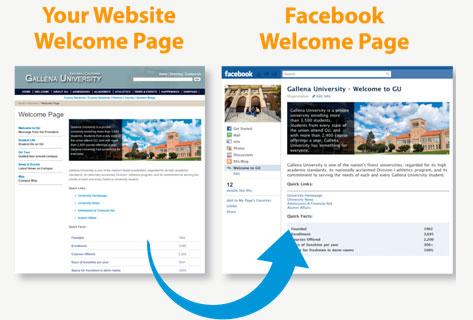 OU Social™ Facebook App — A powerful, yet simple solution for updating your institution’s Facebook Page. An administrator simply installs the OU Social app within their Facebook account, and then selects which OU Campus–managed content to associate with it. Whenever associated content is updated in OU Campus, the same content is automatically and simultaneously updated on Facebook.
(See http://omniupdate.com/products/oucampus/#+features and scroll down to the bottom of the page.)
If your Department’s or College’s webmaster is not an admin of your page, you may want to make him/her one and then provide him/her with the set up documentation, which is available @ http://support.omniupdate.com/documentation/ox/interface/setup/facebook/.
4: Adhere to Terms of Use (or Guidelines or Permissions) for Social Media Icons in Your Promotional Materials
- Facebook @ http://www.facebook.com/brandpermissions/logos.php
- Guidelines for Use of the Twitter Trademark: http://support.twitter.com/entries/77641
- YouTube Branding Guidelines: http://code.google.com/intl/en/apis/youtube/branding.html
5: Social Media Listings and Community Guidelines
- Facebook – Index of University Affiliated Accounts: http://www.wiu.edu/social_networking/facebook.php
- Community Guidelines for WIU Official Facebook Page: http://www.wiu.edu/vpaps/university_relations/social_media_guidelines.php
More questions? Contact me @ (309) 298-1993 or via email at TE-Koltzenburg@wiu.edu or friend me @ http://www.facebook.com/teresa.koltzenburg
 Koltz Klips